Table of Contents
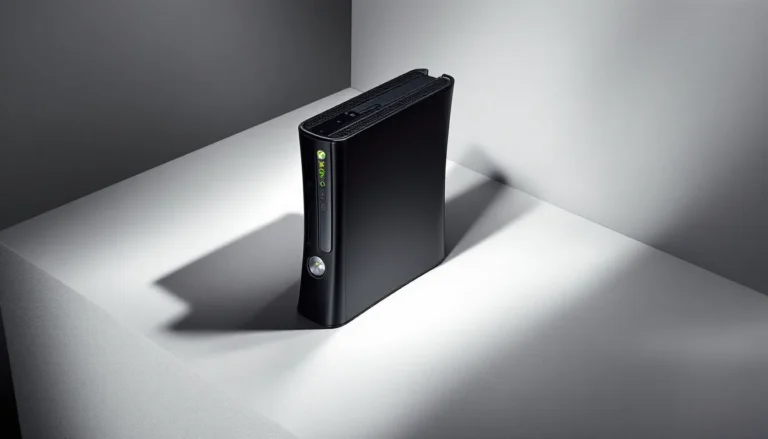
ToggleThe Xbox 360 S, officially dubbed the Xbox 360 Slim, landed in June 2010 as Microsoft’s answer to overheating nightmares, noisy fans, and a chunky design that screamed “mid-2000s.” It was a full redesign, not just a spec bump, and it fixed most of the issues that plagued the original model. Fast-forward to 2026, and this console sits in a weird spot: it’s sixteen years old, but it still has a passionate fanbase and a library of games that defined a generation.
If you’re wondering whether the Xbox 360 S is worth grabbing off eBay, what makes it different from the launch model, or how to get the most out of it in 2026, you’re in the right place. This guide covers everything from hardware specs and setup tips to common problems and the best games that still hold up today.
Key Takeaways
- The Xbox 360 S, released in June 2010, is the most reliable version of the console with a failure rate below 5%, significantly better than the original model’s 23-54% failure rate due to superior 45nm chip cooling technology.
- An Xbox 360 S can be purchased for $50-$100 used and provides access to over 2,100 games, many of which are not backward compatible on modern Xbox Series X|S consoles.
- The Xbox 360 S features integrated 802.11n Wi-Fi, a 250GB hard drive, optical audio output, and five USB 2.0 ports, making it substantially more equipped than the original Xbox 360 model.
- Microsoft officially shut down the Xbox 360 digital store in July 2024, meaning all games must now be purchased as physical discs, though online multiplayer remains functional for now.
- Common Xbox 360 S issues like disc reading failures or overheating can often be resolved through firmware updates, cleaning, or affordable component replacements costing under $50.
- Exclusive titles like Halo Reach, Gears of War 3, Lost Odyssey, and Fable II remain must-play experiences that showcase why the Xbox 360 S is still worth owning in 2026.
What Is the Xbox 360 S and Why Does It Still Matter?
The Xbox 360 S is Microsoft’s second major hardware revision of the Xbox 360 platform. Released in June 2010, it replaced the original “fat” model with a slimmer, quieter, and more reliable design. The official name is just “Xbox 360,” but everyone calls it the “S” or “Slim” to distinguish it from the launch model.
Why does it still matter in 2026? Because it represented a turning point for the Xbox 360’s lifecycle. The original console had a notorious failure rate, up to 54% in some reports, thanks to the Red Ring of Death (RROD). The S model introduced better cooling, a built-in 250GB hard drive (on most SKUs), integrated Wi-Fi, and a significantly quieter operation. It was the version Microsoft should’ve launched in 2005.
Today, the Xbox 360 S matters for retro collectors, budget gamers, and anyone looking to revisit the seventh console generation. It’s the most reliable way to play hundreds of Xbox 360 and original Xbox titles that aren’t backward compatible on Xbox Series X
|
S. Plus, the used market is flooded with them, making it cheap and accessible.
The console also holds sentimental value. It was the last Xbox to use Microsoft Points, the last to ship with a full DVD drive instead of digital-first architecture, and the machine that delivered some of the best multiplayer experiences of the 2010s, think Halo Reach, Gears of War 3, and Call of Duty: Black Ops II.
Key Differences Between Xbox 360 S and Original Xbox 360
If you’re comparing the Xbox 360 S to the original Xbox 360, the differences are immediately obvious, and they go way beyond aesthetics.
Design and Build Quality Improvements
The S model shrunk the footprint by about 17% and adopted a matte black finish with a glossy top panel. The angular, almost stealth-fighter design replaced the curved white plastic of the original. It’s polarizing, some love the aggressive look, others miss the cleaner OG aesthetic, but it undeniably looks more modern.
The internal layout was completely reworked. Microsoft moved to a 45nm CPU and GPU (down from 90nm at launch), which drastically reduced heat output. The console also features a single, larger exhaust fan instead of the dual smaller fans in the original, which made it much quieter. The power supply is still external, but the brick is slightly smaller.
Build quality improved across the board. The disc tray feels more solid, the buttons are touch-capacitive (which is cool until they stop working), and the console includes five USB 2.0 ports instead of three. The S also has a dedicated Kinect port on the back, which the original lacked.
Performance and Hardware Upgrades
Performance-wise, the Xbox 360 S doesn’t run games any faster than the original, they share the same PowerPC Tri-Core Xenon CPU and Xenos GPU architecture. But, the thermal improvements mean the S can sustain performance under load without throttling or crashing.
The S introduced built-in 802.11n Wi-Fi, which was a massive upgrade. The original Xbox 360 required a separate $99 Wi-Fi adapter that plugged into the back, a total rip-off. The S also supports 5GHz Wi-Fi bands, which helps reduce interference in crowded networks.
Another key upgrade: the S uses a proprietary 250GB SATA hard drive (or 4GB of internal flash memory on the base model). The original used slower 2.5″ PATA drives. The SATA drive is faster for game installs and backward compatibility, though the difference is marginal.
Storage and Connectivity Enhancements
The Xbox 360 S ships with either 4GB of internal flash storage or a 250GB hard drive, depending on the SKU. Later models (post-2013) came with 500GB drives. The original Xbox 360, by contrast, had 20GB, 60GB, or 120GB detachable drives, or no drive at all on the Core/Arcade units.
The S also includes an optical audio port (TOSLINK), HDMI 1.2 output (which the original added in later revisions), and a standard AUX port for composite/component cables. The Kinect port delivers dedicated bandwidth, which reduces USB bottlenecks during motion tracking.
Storage expansion is easier on the S. You can use any USB flash drive or external HDD up to 32GB as extended storage (the console formats it), and you can swap the internal HDD with a compatible third-party drive if you’re handy with a Torx screwdriver.
Technical Specifications of the Xbox 360 S
Here’s a full breakdown of the Xbox 360 S hardware specs, which remain identical across all S units except storage capacity:
- CPU: Custom 3.2 GHz PowerPC Tri-Core Xenon (45nm process)
- GPU: 500 MHz Xenos GPU with 10MB eDRAM (45nm process)
- RAM: 512MB GDDR3 RAM
- Storage: 4GB internal flash or 250GB/500GB SATA HDD (user-replaceable)
- Optical Drive: 12x dual-layer DVD drive (DVD±R DL, DVD-ROM)
- Video Output: HDMI 1.2, component (1080p max), composite
- Audio Output: HDMI, optical (TOSLINK), stereo RCA
- Networking: Integrated 802.11n Wi-Fi (2.4/5GHz), Gigabit Ethernet
- Ports: 5× USB 2.0, 1× proprietary Kinect port, 1× AUX port
- Power Supply: External 135W or 150W AC adapter (varies by model)
- Dimensions: 10.6″ × 10.4″ × 2.9″ (270mm × 264mm × 75mm)
- Weight: 6.3 lbs (2.9 kg) without HDD: 6.8 lbs (3.1 kg) with 250GB HDD
- Operating Temp: 41°F to 95°F (5°C to 35°C)
- Backward Compatibility: Supports select original Xbox titles via emulation
The move to 45nm chips was the game-changer. It cut power consumption by nearly 30% compared to the original’s 90nm chips, which translates to less heat, lower fan noise, and a dramatically reduced failure rate. Independent testing in 2011 put the S model’s failure rate below 5%, compared to the original’s catastrophic 23-54% range.
One quirk: the Xbox 360 S doesn’t support native 4K output or HDR, obviously. It maxes out at 1080p for games and can upscale DVDs, but Blu-ray playback isn’t supported. Microsoft launched a separate HD DVD add-on for the original 360, but that format died in 2008.
Should You Buy an Xbox 360 S in 2026?
Whether the Xbox 360 S makes sense in 2026 depends on what you’re after. If you want to play modern AAA titles, obviously this isn’t the console for you. But if you’re chasing nostalgia, building a retro collection, or hunting for games that never made it to backward compatibility, the S is the best version of the 360 to own.
Pros of Owning an Xbox 360 S Today
Access to a massive library. The Xbox 360 has over 2,100 games, and many of them aren’t playable on Xbox Series X
|
S. Titles like Metal Gear Solid HD Collection, Skate 3, Max Payne 3, and Lost Odyssey are stuck on the 360 unless you emulate.
Dirt cheap. You can find a used Xbox 360 S for $50-$100 in good condition. Games run $2-$10 each at GameStop, thrift stores, or eBay. Compare that to modern console prices, and it’s a steal for hours of entertainment.
Reliable hardware. The S is the most dependable Xbox 360 model. If you’re buying used, prioritize the S over the original or the later E model (which removed optical audio and has cheaper build quality).
Local multiplayer and couch co-op. The 360 was the golden age of split-screen gaming. Halo 3, Left 4 Dead 2, Borderlands 2, and Portal 2 all support local play, which is increasingly rare in modern games.
Homebrew and modding scene. The Xbox 360 has a robust modding community. With the right tools, you can install custom dashboards, run emulators, and even play region-locked games. (Disclaimer: modding violates Microsoft’s ToS and can get your console banned from Xbox Live.)
Kinect support. If you’re into motion gaming or retro curiosity, the S has a dedicated Kinect port. Games like Dance Central and Kinect Adventures are still fun for parties.
Cons and Limitations to Consider
Xbox Live is dying. Microsoft officially shut down the Xbox 360 Store in July 2024, meaning you can no longer purchase games or DLC digitally. You can still redownload previous purchases and play online multiplayer (for now), but the writing’s on the wall. Expect full server shutdowns within the next few years.
No modern conveniences. The 360 doesn’t support streaming apps like Netflix or Hulu anymore, those services dropped support years ago. You’re also stuck with 1080p output, no HDR, and no quick resume or modern UI features.
Disc-based library. Physical discs are the only way to expand your collection now that the digital store is closed. That means dealing with scratched discs, laser drift, and the hunt for used copies.
Limited backward compatibility. Only about 600 Xbox 360 games are playable on Xbox Series X
|
S via backward compatibility. The rest are locked to the 360 hardware. If a game isn’t on the Xbox 360 Archives, you’re out of luck on modern hardware.
Aging controllers. The Xbox 360 controller is great, but the D-pad is terrible, and the batteries (AA or rechargeable pack) are outdated compared to modern USB-C charging. If you need a controller charger, budget for rechargeable battery packs.
No official support. Microsoft ended all official support for the Xbox 360 in 2023. If something breaks, you’re fixing it yourself or finding a third-party repair shop.
Best Games to Play on Xbox 360 S
The Xbox 360 library is stacked, and the S model is the best way to experience it. Here are the must-play titles in 2026.
Exclusive Titles Worth Revisiting
Halo Reach (2010). Bungie’s final Halo game is a prequel to Combat Evolved and arguably the best campaign in the series. The multiplayer is still active on custom servers, and the game includes Forge mode for endless custom maps.
Gears of War 3 (2011). The conclusion to the original trilogy nails the balance between bombastic set pieces and emotional storytelling. Horde mode is still a blast with friends, and the game supports four-player co-op.
Forza Motorsport 4 (2012). The last Forza before microtransactions took over. It has over 500 cars, realistic handling, and the Autovista mode with Jeremy Clarkson’s commentary. Still the best sim racer on the platform.
Lost Odyssey (2008). Hironobu Sakaguchi’s JRPG masterpiece is Xbox-exclusive and often overlooked. It’s a 40+ hour epic with turn-based combat and one of the best stories of the generation.
Fable II (2008). Peter Molyneux over-promised as usual, but Fable II is still a charming action-RPG with meaningful choices, co-op, and a dog companion that’s better than most human NPCs.
Alan Wake (2010). Remedy’s psychological thriller blends Twin Peaks vibes with Resident Evil 4 combat. It’s available on modern platforms now, but the 360 version has a different lighting engine that some fans prefer.
Red Dead Redemption (2010). Rockstar’s Wild West epic is backward compatible on Xbox Series X
|
S, but the 360 version is the original experience, bugs, 720p resolution, and all. It’s also dirt cheap used.
Backward Compatible Original Xbox Games
The Xbox 360 S supports over 500 original Xbox titles via software emulation. Here are the best:
Halo 2 (2004). The multiplayer servers are long dead, but the campaign is still legendary. Dual-wielding, the Arbiter levels, and that cliffhanger ending, it’s essential.
Star Wars: Knights of the Old Republic (2003). BioWare’s RPG is one of the best Star Wars games ever made. The twist still hits, even if you know it’s coming.
Ninja Gaiden Black (2005). The definitive version of Team Ninja’s brutal action game. It’s punishingly hard, but the combat is flawless.
Crimson Skies: High Road to Revenge (2003). Arcade dogfighting with a dieselpunk aesthetic. It’s criminally underrated and runs great on the 360 S.
Burnout 3: Takedown (2004). The best arcade racer of the sixth generation. Crash mode is still addictive, and the soundtrack slaps.
You can find the full backward compatibility list on Windows Central or Pure Xbox, both of which maintain updated databases of supported titles.
How to Set Up and Optimize Your Xbox 360 S
Setting up an Xbox 360 S in 2026 is straightforward, but there are a few quirks worth knowing.
Initial Setup and Account Configuration
Plug in the external power brick (make sure it’s the correct wattage, 135W or 150W depending on your model), connect HDMI to your TV, and power on. The console will walk you through language, time zone, and video settings.
You’ll need a Microsoft account to access Xbox Live features, even though the digital store is closed. If you have an existing account from the 360 era, you can sign in. Otherwise, create one on the console or via the Xbox website.
Important: If you’re buying used, factory reset the console to wipe the previous owner’s data. Go to Settings > System > Console Settings > System Info and select Restore Factory Defaults. This won’t delete system updates, but it will clear saved profiles and games.
Network and Xbox Live Setup
Connect to Wi-Fi via Settings > System > Network Settings > Wireless Network. The S supports WPA2 encryption, but older routers using WEP might cause issues. If Wi-Fi is flaky, use the Gigabit Ethernet port instead, it’s faster and more stable.
Once connected, the console will prompt you to download system updates. As of March 2026, the final dashboard version is 2.0.17559.0 (released in 2024). These updates are mandatory for Xbox Live access and some disc-based games.
Xbox Live Gold is no longer required for online multiplayer on the 360, Microsoft removed that paywall in 2023 after shutting down the store. You can still access Xbox 360 Gold features if you have an active Game Pass Ultimate subscription, which includes legacy perks.
Storage Expansion and Management Tips
If you have the 4GB flash model, you’ll run out of space fast. Game installs, DLC, and save files add up. Here’s how to expand storage:
- USB storage: Plug in any USB 2.0 flash drive or external HDD. The console will format up to 32GB of it for Xbox use. You can connect two USB devices simultaneously for 64GB total.
- Hard drive upgrade: The 250GB and 500GB HDDs are proprietary, but third-party clones are available on Amazon for $20-$40. Swapping drives requires a Torx T10 screwdriver and takes about 10 minutes.
- Game installs: Install disc games to the HDD to reduce load times and fan noise. Go to My Xbox > Game Library, select a game, and press Y to install. Installs take 5-10 minutes and free up 4-8GB of space.
Manage storage via Settings > System > Storage. Delete old saves, demos, and DLC you don’t use. Save files are tiny (usually under 1MB), but game installs can reach 8GB.
Common Xbox 360 S Problems and How to Fix Them
Even though the S is more reliable than the original, it’s still a 16-year-old console. Here are the most common issues and how to fix them.
Red Ring of Death and Error Codes
The Red Ring of Death (RROD), three red quadrants around the power button, is rare on the S, but it can still happen. The S uses a different LED system: instead of red lights, you’ll see a single red dot or a blinking pattern. Each code corresponds to a specific error:
- E64: DVD drive failure. The laser or drive motor is dying.
- E68: Hard drive failure. Disconnect the HDD and reboot to test.
- E74: General hardware failure, often related to the GPU or AV cable.
- E79: Hard drive error or dashboard corruption. Try a factory reset.
If you see a single red dot, check the error code by pressing the eject button four times, then the sync button four times. The LED will blink a pattern (e.g., one blink, pause, two blinks = E12).
Most RROD issues on the S are caused by overheating or dust buildup. Open the console, clean the fan and heatsink with compressed air, and reapply thermal paste if you’re comfortable with disassembly. If the GPU has cracked solder joints (rare but possible), you’ll need a reflow repair or a new console.
Disc Reading Issues and Solutions
If your Xbox 360 S won’t read discs, try these steps:
- Clean the disc. Wipe from the center outward with a microfiber cloth. Avoid circular motions.
- Test multiple discs. If only one disc fails, it’s scratched or damaged.
- Check for firmware updates. Some disc issues are fixed by dashboard updates.
- Open the tray manually. Power off, unplug, and use a paperclip in the manual eject hole (next to the USB ports).
- Replace the drive belt or laser. The DVD drive uses a rubber belt that degrades over time. Replacement belts cost $5 on eBay, but installation requires disassembly.
If the drive is completely dead, you can’t just swap in a new one, Xbox 360 drives are firmware-locked to the motherboard. You’ll need to flash the drive’s firmware or buy a pre-flashed replacement keyed to your console, which is complex and voids any remaining warranty.
Other common issues include noisy fans (clean or replace), overheating (improve ventilation or repaste), and driver conflicts on PC when using the controller wirelessly.
Where to Buy an Xbox 360 S and What to Look For
The Xbox 360 S is all over the used market. Here’s where to buy and how to avoid duds.
eBay is the most popular option. Prices range from $50 for a console-only unit to $120 for a bundle with controllers and games. Look for sellers with high ratings and detailed photos. Avoid listings that don’t show the console powered on, no power = potential RROD or dead PSU.
Facebook Marketplace and Craigslist are goldmines for local deals. You can test the console before buying, which is a huge advantage. Bring a controller and a game to verify the disc drive works and the console boots without errors.
GameStop still sells used Xbox 360 S consoles for $80-$100, and they include a 30-day warranty. The markup is steep, but the peace of mind might be worth it.
Thrift stores and garage sales are hit-or-miss. You might score a $20 console, or you might get a bricked unit with a dead HDD. Always test before you buy.
What to check before buying:
- Power it on and verify no red dots or error codes.
- Insert a disc and confirm it reads within 10-15 seconds.
- Check all USB ports, HDMI output, and Wi-Fi connectivity.
- Inspect the power brick. The green LED should stay solid, not flicker or turn orange.
- Look for physical damage: cracks, missing panels, or signs of liquid damage.
- Ask if the console has been modded. Modded consoles are banned from Xbox Live and may have unstable firmware.
Model variations to know:
- Xbox 360 S (2010-2013): Glossy top panel, touch-sensitive buttons, 250GB or 4GB.
- Xbox 360 E (2013-2016): Matte finish, physical buttons, looks like an Xbox One. Cheaper build quality, no optical audio.
Stick with the S over the E if possible. The S has better build quality and the optical audio port, which is useful for surround sound setups.
For games, hit up GameStop, DKOldies, or local game stores. Digital purchases are no longer possible, so physical is your only option. Avoid buying games from Amazon unless the seller has a good return policy, disc condition varies wildly.
If you’re shopping for accessories, check out buying guides on Tom’s Guide for controller comparisons and headset recommendations.
Conclusion
The Xbox 360 S holds up as the best version of a console that defined a generation. It fixed the catastrophic hardware failures of the original, introduced Wi-Fi and HDMI as standard, and delivered hundreds of hours of gaming that still feel great in 2026. Whether you’re revisiting classics, hunting for games that never made the jump to backward compatibility, or building a retro collection, the S is the reliable workhorse you want.
Just remember: Xbox Live’s days are numbered, the digital store is dead, and official support ended years ago. But for $50-$100, you get access to one of the best gaming libraries ever assembled, and that’s hard to beat. If you’re serious about the 360 in 2026, grab an S model, stock up on physical games, and enjoy the shooting games and RPGs that made this console a legend.